DataMagic is an interactive system for turning tabular data into narrated, animated, and editable data insight videos. It is designed for analysts, researchers, and teams who need data to become a story rather than a static chart.
The system supports three practical paths: a complete multi-scene pipeline, a faster generation mode for quick reports, and Single Chart for one focused animated visualization. Users can preview results, refine text and visuals, and export real MP4 videos.
Under the hood, DVSpec keeps visual elements tied to source data fields and aligns animation timing with narration, so the result stays traceable, editable, and suitable for data communication.
DataMagic supports both complete data-story videos and lightweight chart generation, depending on how much structure and speed the task needs.
Representative outputs across business, energy, and technology datasets. Each example is a real video generated from structured data and a natural-language intent.
DataMagic includes more than 100 ready-made visual styles across bar, line, pie, scatter, Sankey, waterfall, KPI card, and narrative scenes. Template recommendation helps match the data shape and communication goal before rendering begins.
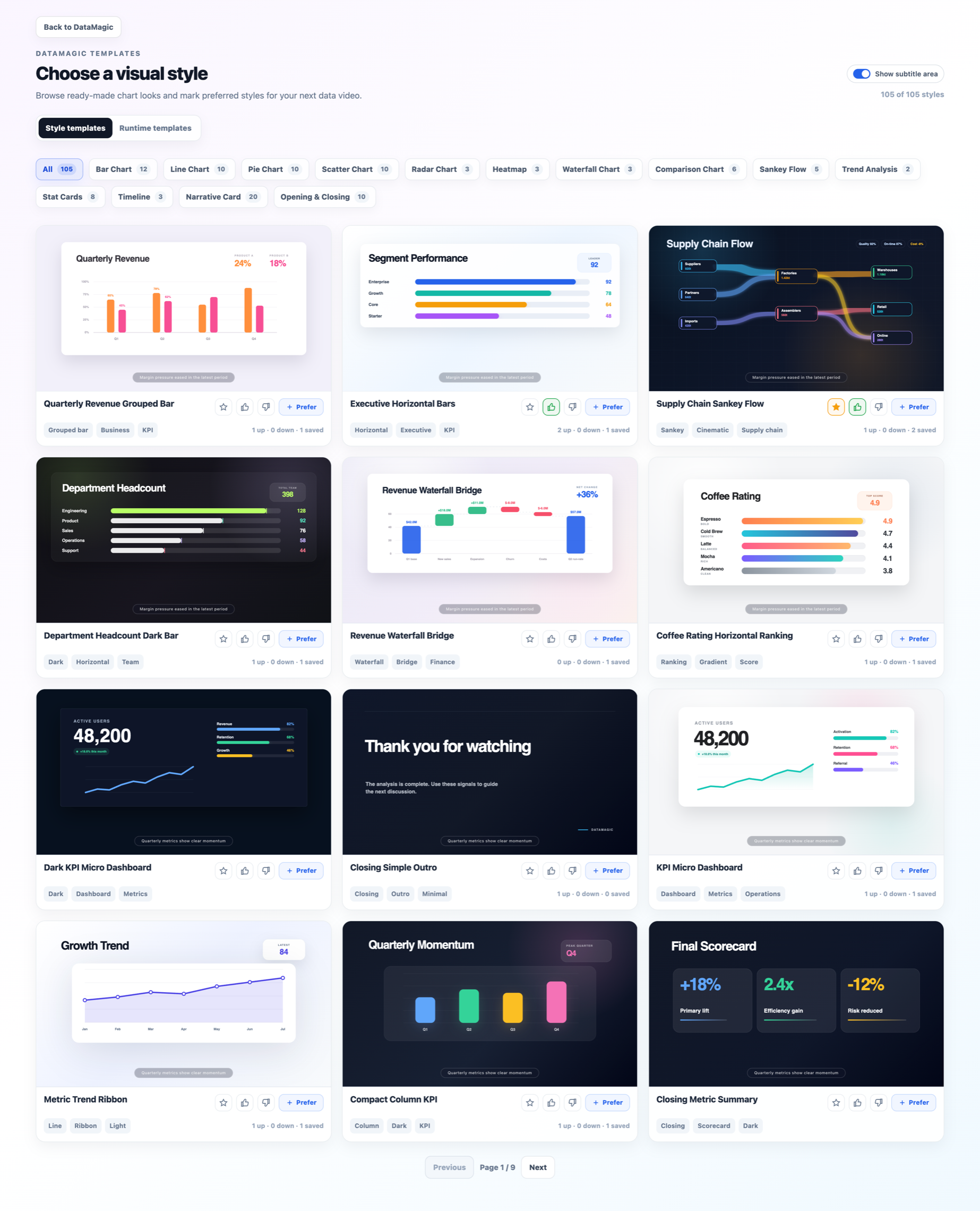
Template Gallery — browse, preview, and mark preferred visual styles before generating a video or Single Chart.
Generate presentation-ready data videos from uploaded tabular data, including scene planning, chart selection, narration, animation, and export.
Use optimized generation and rendering paths when speed matters, while still keeping AI-assisted planning and narrative structure.
Paste or upload data and quickly generate one animated visualization without running the full multi-scene story pipeline.
AI recommends chart types and style templates from the gallery based on the data columns, analytical goal, and desired communication style.
Preview generated videos, edit text directly, refine with natural language, and keep updates local where possible instead of regenerating everything.
Visual elements are bound to underlying data fields through DVSpec, making generated stories easier to inspect, revise, and trust.
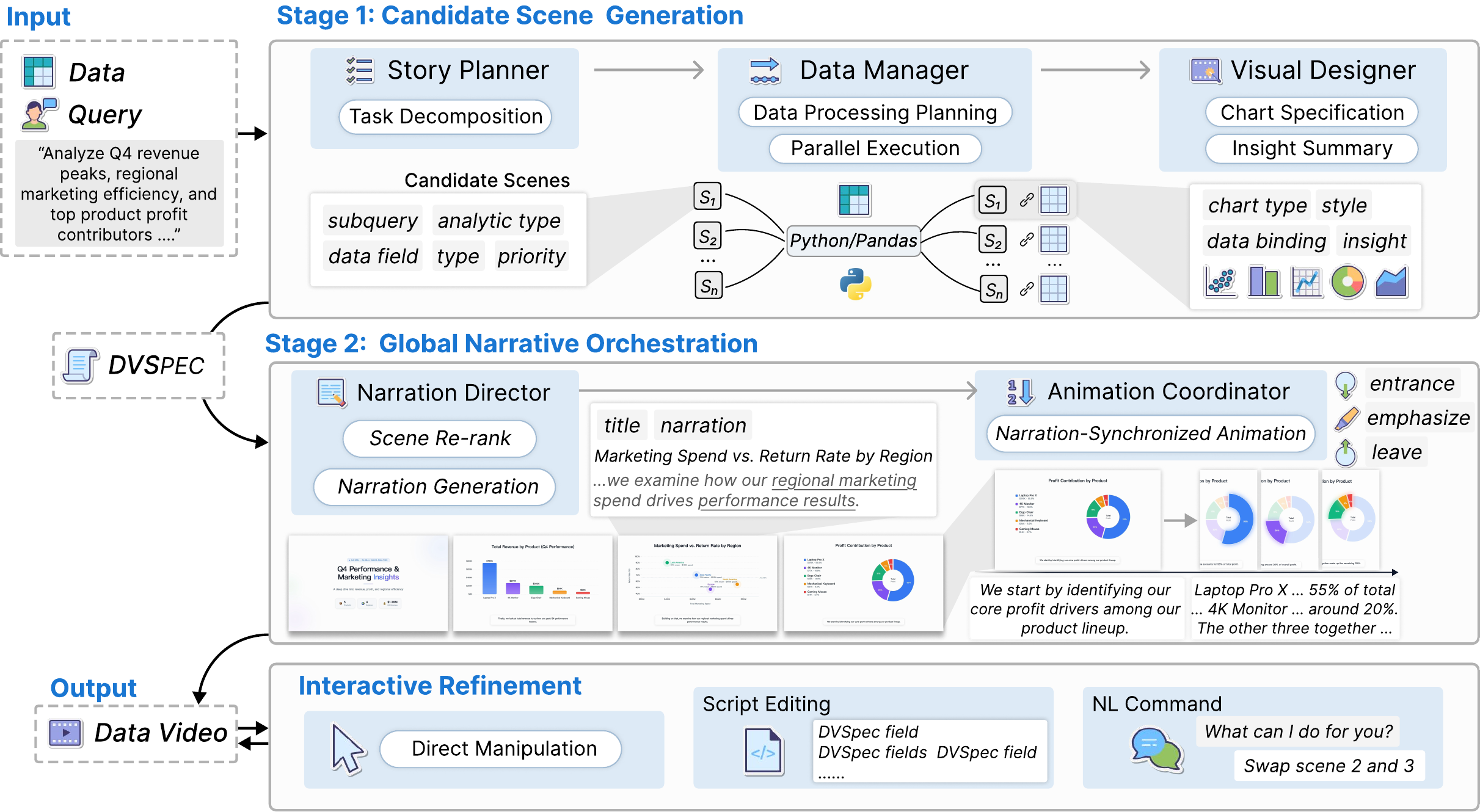
DataMagic processes raw tabular datasets and natural language queries through a two-stage multi-agent engine, producing a DVSpec configuration compiled into a complete narrative video.
Fig. 1 — Two-stage pipeline from raw tabular data to narrative video, with DVSpec as the structured intermediate representation.
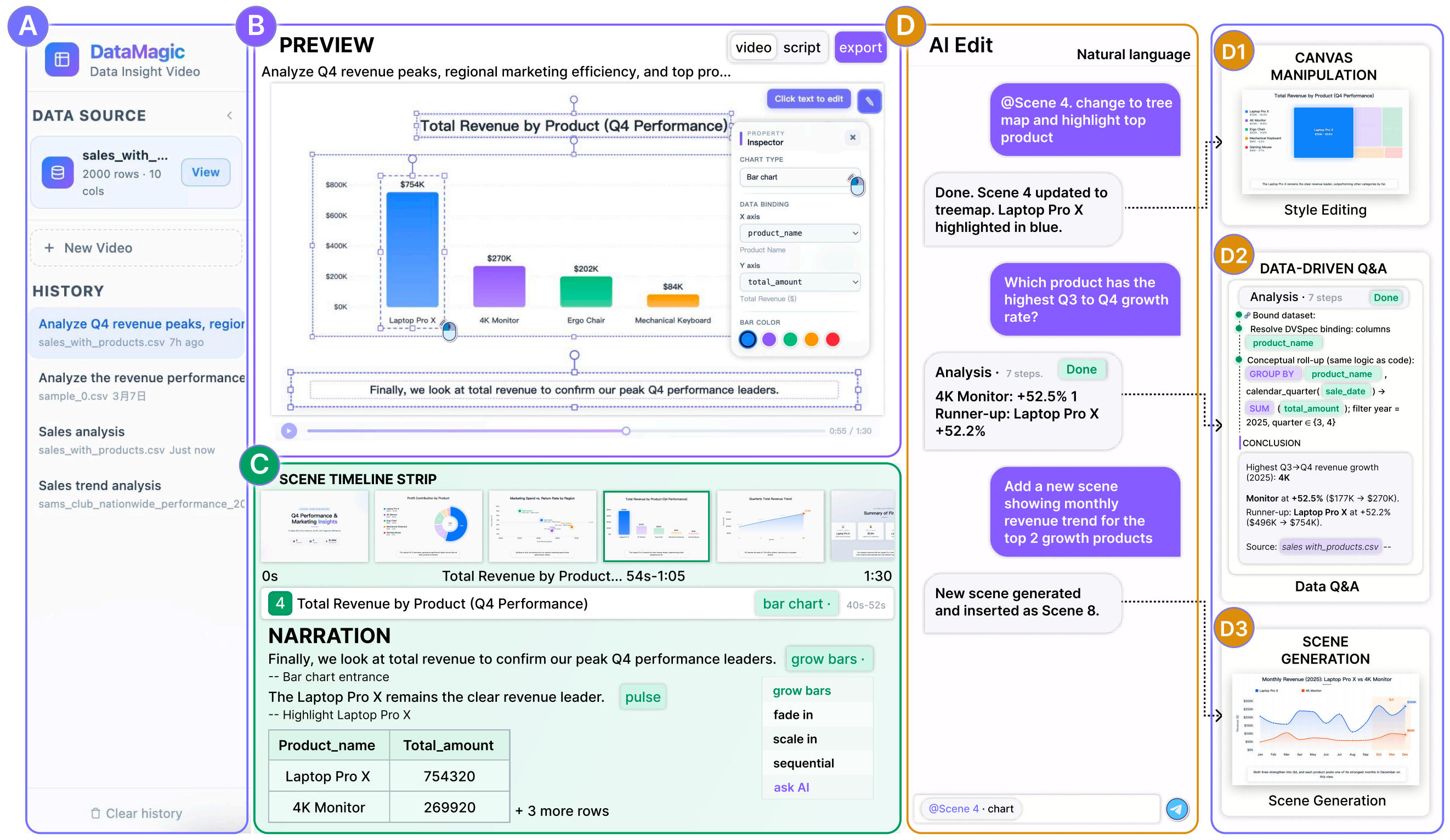
The web interface provides four panels — upload & history (A), real-time video preview (B), scene timeline & narration editor (C), and AI-assisted editing (D) — supporting three complementary interaction modes.
Fig. 2 — System Interface
Upload a business CSV and enter a natural language query — "Analyze Q4 revenue peaks, regional marketing efficiency, and top product profit contributors." Watch the multi-agent engine execute in real time: query decomposition → parallel data slicing → chart design → narrative orchestration.
Unlike black-box generation, the system transparently displays the scene timeline, narration text, animation labels, and underlying data tables — every visual element traceable back to the source CSV.
Refine the generated video through three modes sharing a single DVSpec state — edits are local and incremental, never triggering full regeneration:
DVSpec preserves full semantic provenance, turning one-way videos into explorable data interfaces:
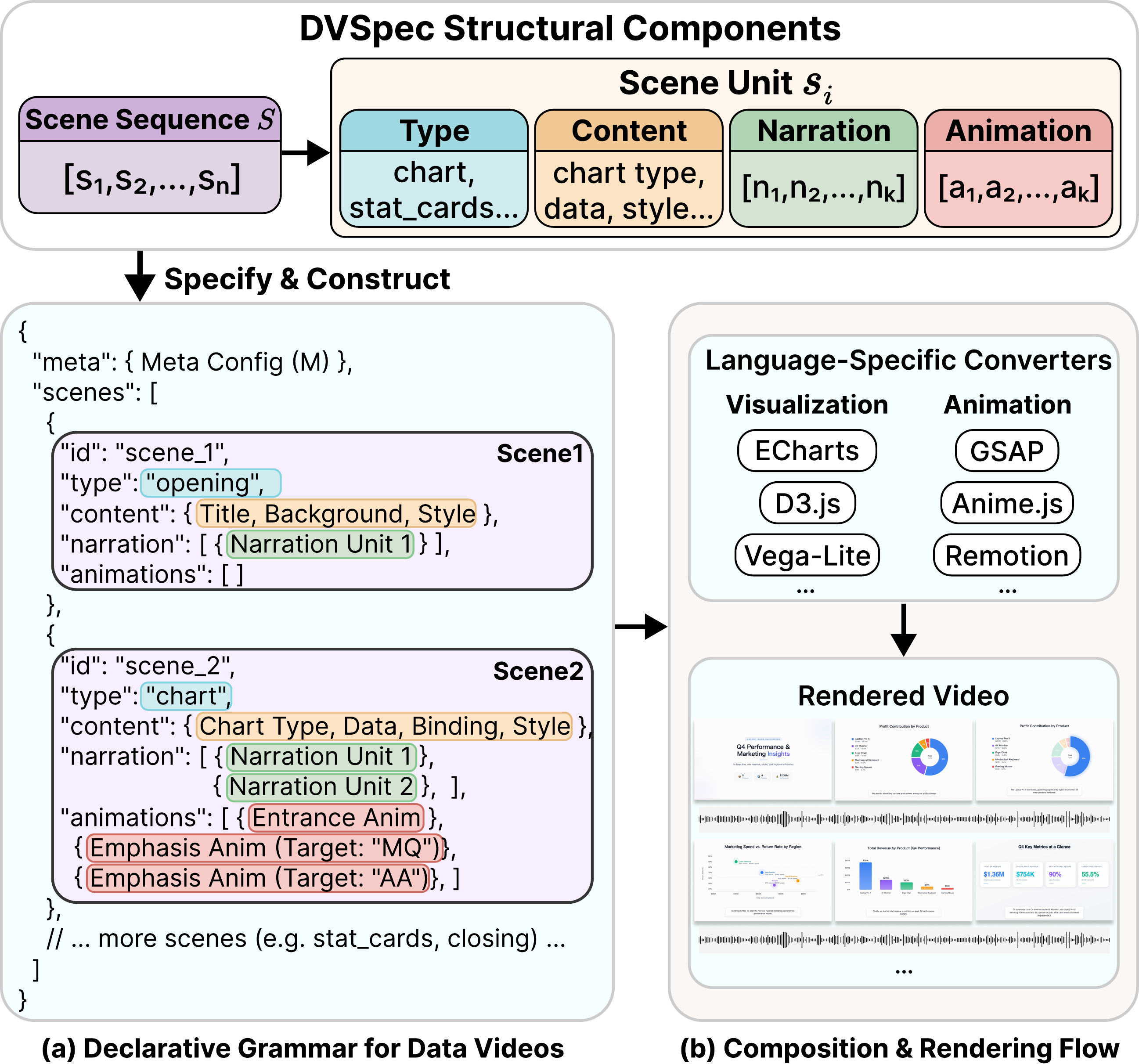
Existing specifications — Vega-Lite, Canis — cover static charts or single-chart animations, but lack unified cross-modal temporal coordination for multi-scene data videos. DVSpec fills this gap: a structured intermediate representation that fully decouples logical description from rendering implementation.
Visual elements are referenced by data attribute values — e.g., {"product": "4K Monitor"} — not hard-coded identifiers. References stay valid across data updates and chart-type changes, ensuring every pixel traces back to a CSV cell.
Animation triggers are declared with narration segment indices, not absolute timestamps. When users edit narration text and TTS audio duration changes, the system automatically re-aligns all animation timing — no manual keyframe adjustment.
Fig. 3 — DVSpec structure (a) and rendering flow (b). Translated by language-specific converters into D3.js visualizations and Remotion animations.
// Chart scene — semantic references + narration-indexed triggers { "type": "chart", "content": { "chart_type": "bar", "data_bindings": { "x": "product", "y": "growth_rate" } }, "narration": [ "4K Monitor leads with 52.5% Q3-to-Q4 growth,", // index 0 "followed by Laptop Pro X at 52.2%." // index 1 ], "animation": [ { "type": "highlight", "target": { "product": "4K Monitor" }, // semantic ref — not a pixel coord "trigger": { "narration_index": 0 } // auto-aligns to TTS duration }, { "type": "highlight", "target": { "product": "Laptop Pro X" }, "trigger": { "narration_index": 1 } } ] }
DataMagic is live and will be progressively open-sourced with more implementation notes, datasets, and template examples.
The core generation modes are available for multi-scene videos, faster report generation, and one focused animated chart.
Users can browse visual styles, preview generated videos, edit text, and refine output through natural-language interaction.
We are preparing more documentation around the pipeline, DVSpec, template adapters, and deployment workflow.
Upcoming work focuses on improving style selection, learning from user feedback, and expanding examples and benchmark cases.
The hosted product is open for public use. The source code is being progressively released, and feedback from real data-video use cases is welcome.